
Everything between two visits is a travel.
When you leave a place, Places records the route. When you settle at the next place, it closes the trip and gives it a travel type, like walking, cycling or driving.
Most trips get the right type on their own. The default travel type covers the ones that cannot.
How travels are detected
Your phone’s motion sensors split each trip into segments, like a walk to the station and then the ride. Places then looks at the speed and distance of each one:
- Walking and running come straight from the motion sensors.
- Cycling comes from the motion sensors at bike speeds.
- Car speed over a real distance counts as a vehicle trip.
- Long, very fast trips count as flights.
Everything else, like a boat or a chairlift, is yours to tag by hand.
Why car-speed trips need a default
On GPS, a car, a taxi, a bus and a train can look exactly the same. Places can tell you moved at car speed, but it cannot tell what you were riding.
So those trips get your default travel type. It starts as Driving.
If you mostly take the subway, ride the bus or use Uber, set that as your default. Most days then log correctly, and you only fix the exceptions.
How to set it
1. Open the account menu with the button in the top right.
2. Tap App settings in the main menu options. Most of your settings live here.
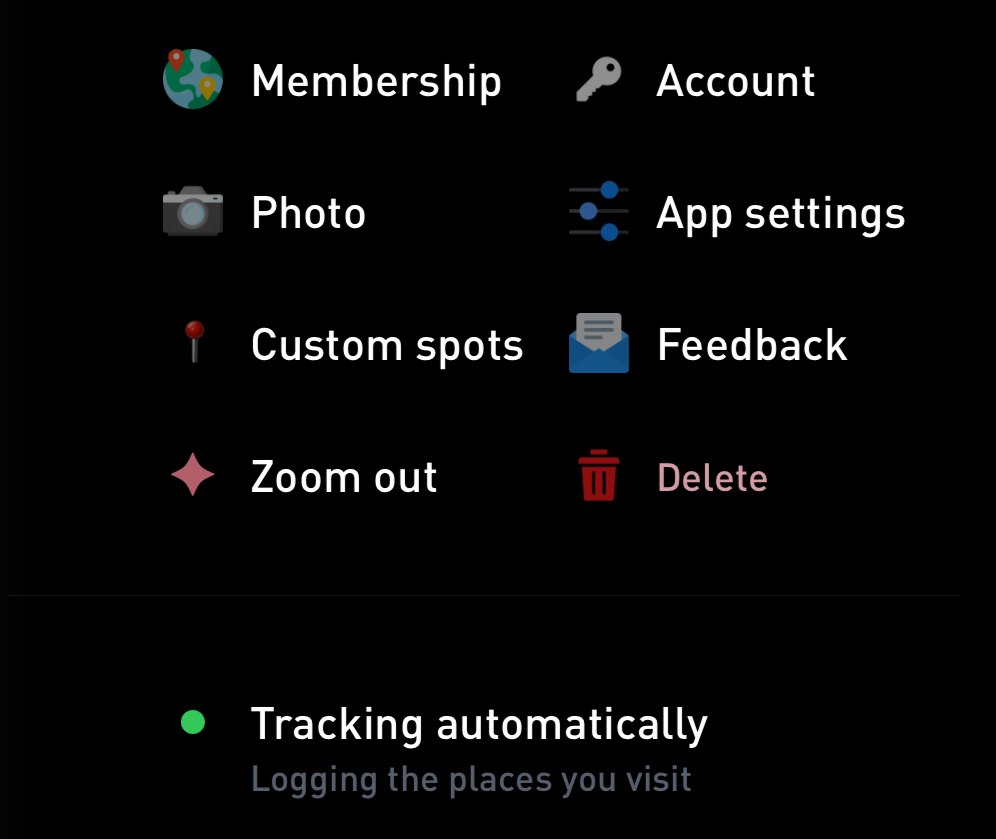
Tap App settings (1).
3. Under Default travel type, pick the one you take most often.
You can also get there from the Places tracking screen. Tap Tracking automatically in the account menu, then Customize next to Default travel type.
The options are Driving, Cycling, Scooter, Motorcycle, Uber, Lyft, Taxi, Bus, Subway, Train and Tram.
In Gyroscope Health, open Places, tap the gear and choose Default travel type.
The setting only shows in the app that is tracking. If Places says travel and tracking settings live in Gyroscope Health, change it there.
The new default applies to trips from then on. Past trips keep their type.
Fixing a single trip
- Open the trip on your timeline.
- Tap Change next to Travel type.
- Pick the right one. The types you used most over the last two weeks sit at the top.
The list has 25 types, including ones no sensor would guess, like a boat, a ski day or a helicopter.
If a trip was really a stop, open it, tap Edit this travel and choose Convert to a visit.
Tips
- Fast bike rides can reach car speed. If one shows up as a vehicle trip, change it to Cycling.
- Name the airports on your trips. It helps Places detect the flights between them.
- If you drive for work, check the type of the trips you log for mileage.
The Tracking Travels & Motion guide has more on travel modes, messy routes and battery use.