Entschuldigung, diese Seite ist noch nicht übersetzt.
Your lifestyle
Your AI tools
Sleep
Food
Workouts
Places
Steps
Weight
Claude
ChatGPT
Gemini
Grok
MCP Bridge
The MCP Bridge connects your AI assistant to your realtime Gyroscope data.
If you use Claude, ChatGPT, Codex, Gemini, Grok or other similar AI tools, now you can give them live context direct from your Gyroscope app.
This can be used for exploring your data, finding correlations, building automations, logging data on your behalf, or just giving your assistants more context of your life instead of needing to type everything in.
Take years of history into the AI tools you already use. Export it, chart it, test your own theories and build on top of it.
“Chart my sleep against caffeine for the last two years.”
How it works
Connect once. Then just ask.
01
Connect
Add the official Gyroscope plugin in ChatGPT, or the connector in Claude.
Claude
Add custom connector
NameGyroscope
Remote MCP server URLhttps://mcp.gyrosco.pe/mcp
Add
02
Choose what to share
Securely connect your Gyroscope account. You can choose which items you want to share, or whether they are allowed to write.
gyrosco.pe
Connect Claude to Gyroscope
Daily report, food, sleep, steps, workouts
Allow logging to my account
Places and travel
Journal and mood
Allow
03
Ask anything
Your AI can look up your data with the same tools your Gyroscope coach uses.
ChatGPT
Using Gyroscope
How did I sleep this week?
As easy as sending a message.
Type a message or paste a prompt, and your info automatically and securely shows up. It’s almost magical.
How it works
A secure bridge to your account.
Only connect to a trusted source. We recommend only using on the highest intelligence settings. You must keep a close eye on these agents, they may make mistakes.
Protected vault access
Places and your journal stay locked until you switch each one on while connecting your AI.
What it can do
Read your food, sleep, steps, workouts and day summaries for the dates it asks about.
With separate permission, read places and travel.
Load trends across months or years, like weight, steps and sleep.
Log simple things for you: meals, workouts, weight and more, with the same checks as the app.
What it never does
See your password. You sign in on gyrosco.pe; the assistant only ever holds its own key.
Read your coach conversations or coach memory.
Delete or edit anything.
Change your account, plan or settings, or set reminders.
See anyone else's data, or act for other people.
Run on your behalf when you are not asking.
Access Gyroscope from everywhere.
Your assistant checks Gyroscope, then answers with your own numbers.
I’m in Kyoto for the weekend. Where should I eat tonight?
Y
Checked your location and targets in Gyroscope
You’re near Nishiki Market with 76g of protein left for today. A yakitori counter on Pontocho is 8 minutes away and would cover most of it.
Knows where you are
With Places switched on, your AI sees the city you’re in, so you never type where you are.
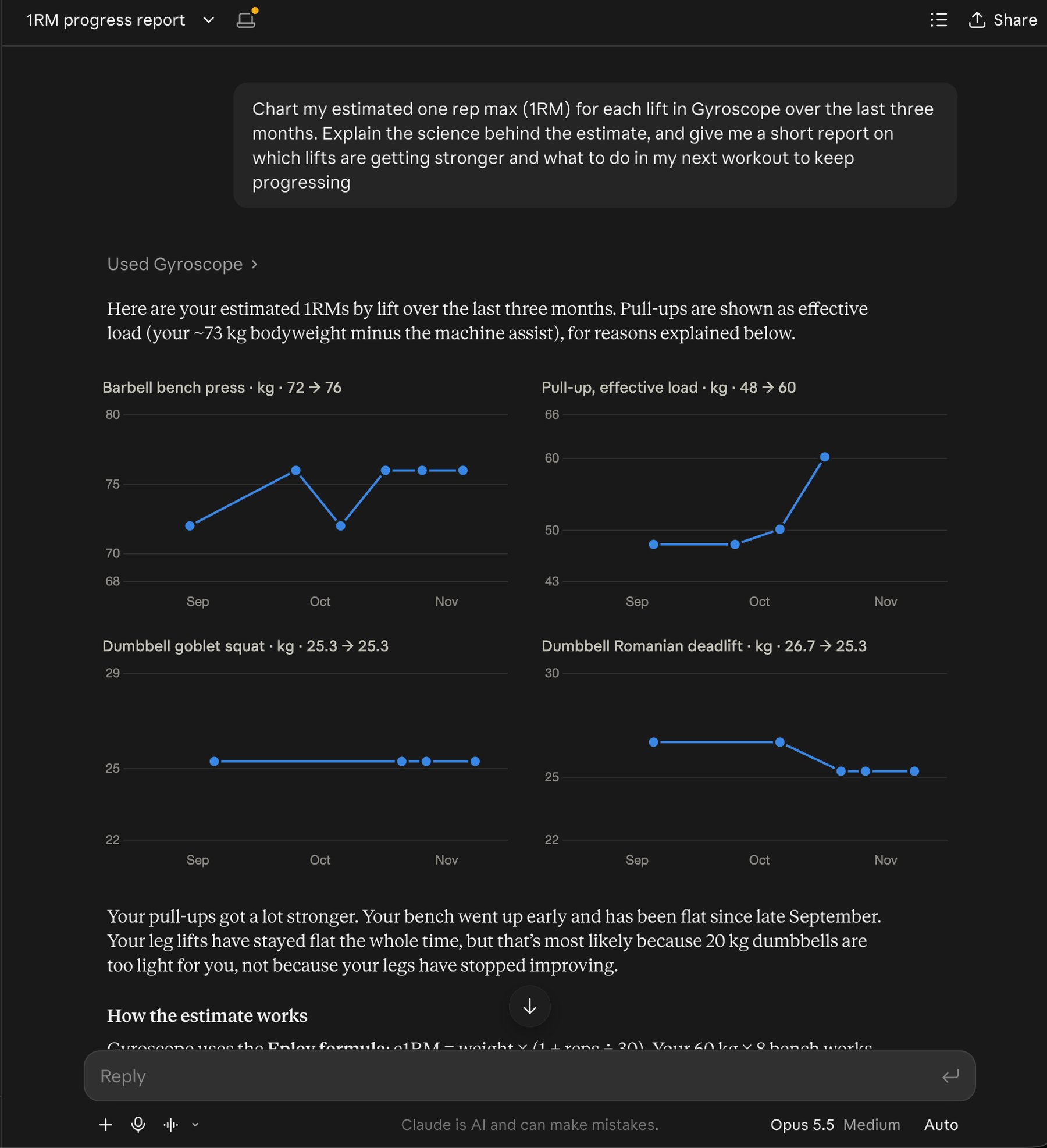
Analyze every lift from the last year. Which muscle groups are behind?
Y
Loaded 186 strength sessions from Gyroscope
Pressing grew the most, with your bench up 14%. Pulling and hinging are behind: rows and deadlifts are up under 3% on about half the weekly sets. Two more rowing sets and one hinge a week would even it out.
Your own data science
Load a whole year of raw history and find patterns across lifts, sleep, food, places and more.
How did I do yesterday?
Y
Looked up yesterday in Gyroscope
7,562 steps, no workout and 6.2 hours of sleep (score 100). 2,793 kcal with 146g protein: a high-protein day with most calories after 4pm.
Your Apple Health data, anywhere
Steps, sleep and workouts from your iPhone and Apple Watch sync into Gyroscope, so any AI on any device can see them.
Export my weight and bodyfat history as a CSV.
Y
Loaded your weight history from Gyroscope
Here’s every weigh-in since March 2021: 1,284 rows with date, weight and bodyfat, saved as weight_history.csv.
Own your data
Take any history out as raw data whenever you want, or log new data in from any app.
Realtime intelligence
Upgrade your AI.
Give your existing AI subscriptions new tools and capabilities. With the Gyroscope MCP Bridge, your ChatGPT or Claude can have realtime context of you and your life. Less generic advice, less hallucinations, more intelligence. All automatic.
Your lifestyle
Hand off the busywork between Gyroscope and your other apps.
“Can you pull up my current jetlag score and plan my calendar for the next few days?”With Places switched on, your AI can pull your location history to see how far you traveled and work out your jetlag, then plan the next few days around it, when it has your calendar connected too.PlacesSleepBedtimeProtected vault access
“Add my next three workouts from my Gyroscope program to my calendar.”Your AI can load your current program from Gyroscope and put each session on your calendar, when it has your calendar connected too.ProgramWorkouts
“Plan a week of dinners that hit my protein target, then make the shopping list.”Your AI can start from your real targets and the meals you already eat, then turn the plan into a list.TargetsProteinFood history
“Find restaurants near me with food that fits my meal targets and is similar to what I ate last week.”With Places switched on, your AI knows where you are, what you have left for the day and what you’ve been eating, then searches what’s nearby.PlacesTargetsFood historyProtected vault access
“Which hotels did I get the best sleep in?”With Places switched on, your AI can match every night of sleep with where you stayed, across all your trips.PlacesSleepBedtimeProtected vault access
Correlations
Go deeper with your weight, steps, sleep and heart rate, and bring in the latest research.
“Compare my summer and winter: mood, steps, sleep and resting heart rate. What should I change?”With your journal switched on, your AI can line up each season across mood, steps, sleep and resting heart rate, find the months that dip and suggest what to change before they come back.StepsSleepResting heart rateMoodProtected vault access
“Chart my weight against my daily steps for the last six months.”Your AI can pull every weigh-in and step total, build the chart itself and point out the stretches where they moved together.WeightSteps
“Find what changed in the months my resting heart rate dropped.”Your AI can load a year of history across sleep, training and food and look for what moved together.Resting heart rateRunsSleepMeals
Your data, your tools
Pull years of raw history into the AI tools you already use, then analyze it, chart it or build on it.
“Load every night of sleep from the last two years and find what my best nights have in common.”Your AI can load your raw history month by month and run the analysis itself, across everything you track in Gyroscope.SleepBedtimeCaffeineWorkouts
“Turn every workout this year into a spreadsheet with weekly totals.”Your AI can pull the raw rows and hand you a file to keep, or fill a sheet when it has your spreadsheet app connected too.WorkoutsRunsLifts
“Compare my steps, sleep and calories this year against last year, month by month.”Two years side by side, from the same raw history the app keeps.StepsSleepCalories
“Does caffeine after 2pm change my sleep? Run the numbers.”Your AI can line up every logged coffee with that night’s sleep and test it on your own data.CaffeineSleepBedtime
Add more data
Repeat a usual meal, log a run or add a note to your journal from whatever AI you have open, straight into your Gyroscope account, or build custom automations on top.
Repeat my usual protein shake for lunch.
Y
Logged your usual shake to Gyroscope
Added your usual chocolate protein shake as lunch at 12:40, the same as Monday’s.
I ran 8 km along the river this morning in 41 minutes.
Y
Saved a run to Gyroscope
Done. An 8 km run this morning in 41 minutes, 5:08 per km, is on today’s timeline.
Add to my journal: 40 minutes of piano, finally got through the first page.
Y
Added a journal entry to Gyroscope
Added to your journal as Piano practice: 🎹 40 minutes. Keep the same label each night and it builds into a series.
“Repeat my usual protein shake for lunch.”Your AI finds the meal you usually have and logs it again for today, with no details to type.Meals
“Add to my journal: 40 minutes of piano, finally got through the first page.”Log custom habits and more in your journal, with a label, number and emoji to follow over time. Your Gyroscope coach sees it as context.Journal
“Every night at 9, ask how my piano practice went and add it to my journal.”Set it up once as a scheduled task in Claude or ChatGPT. The same label each night builds a series you can chart.Journal
“Log my usual morning supplements.”Your AI repeats the supplements you already log in Gyroscope, without opening the app.Meals
Connect
How to set up your AI
The MCP connection takes less than a minute to set up. Add the official Gyroscope listing in Claude or ChatGPT, or paste one URL into any other AI app.
VS Code asks you to sign in on gyrosco.pe when the server first starts.
Claude Code signed in with your Claude account already has the connector you added in Claude, so you can skip this there.
For any other app that supports remote MCP servers.
Name
Gyroscope
Server URL
https://mcp.gyrosco.pe/mcp
Transport
Streamable HTTP
Authentication
OAuth 2.1. Leave client ID and client secret blank.
Your app needs OAuth 2.1 with Client ID Metadata Documents. Apps that only connect with an API key, OAuth 1 or dynamic client registration cannot connect yet.
Privacy
You choose what to share
You sign in on gyrosco.pe. ChatGPT and Claude never see your password. Each connection gets its own key, scoped to the categories you picked when you connected.
Places and your journal are off unless you tick them. There is no share-everything switch.
Revoke a connection any time from the assistant's own settings, or from Connected apps in your Gyroscope account. Revoking stops access immediately.
We keep a log of which tool was called and when, never the contents. We do not use your data to train anyone's model; what the assistant does with a conversation is governed by that assistant's own policy.
No. It can read your numbers and talk about them. It is not a doctor and neither are we; for anything about a diagnosis, medication or treatment, talk to your physician.
Claude and ChatGPT have official Gyroscope listings you add in one click. Claude Code, Codex, Gemini and Grok connect with the same URL, and so does any other app that supports MCP.
Yes. Log your meals in the Gyroscope app, then bring your food history into ChatGPT or Claude to review weeks of meals, find what changes your sleep or energy and plan around your targets. You can also repeat a usual meal from your AI, and it goes straight into your food log.
Everything you sync to Gyroscope. Oura, Whoop, Garmin and Withings connect directly, Apple Watch comes in through Apple Health, and Strava syncs too. Gyroscope merges them into one history, so your AI sees every device in one place.
It reads the same data you see in the app. Food you log by text is saved as text; Gyroscope analyses it afterwards the way it does in the app. If the assistant estimates calories in conversation, that is the assistant's estimate.
No. You pick categories when you connect; Places and Journal are separate switches that are off unless you turn them on. It reads what you ask about.
It can log simple things like meals and workouts. It cannot edit or delete anything: deleting is done in the app. It cannot touch your account or billing.
From the assistant's connector settings, or from Connected apps in your Gyroscope account. Disconnecting revokes the key immediately.
No. The coach in the app is more tested and guided, and it is the best place for the day to day. The bridge is more raw and up to you, for bigger analysis, custom reports, trip planning and automations with your other apps.
MCP Bridge
Connect Gyroscope to your AI assistant.
It takes less than a minute to set up, and every answer starts from your own data.
















 Checked your location and targets in Gyroscope