
Computer Time
How much of your day is the screen, and why the last hour is the one that costs.
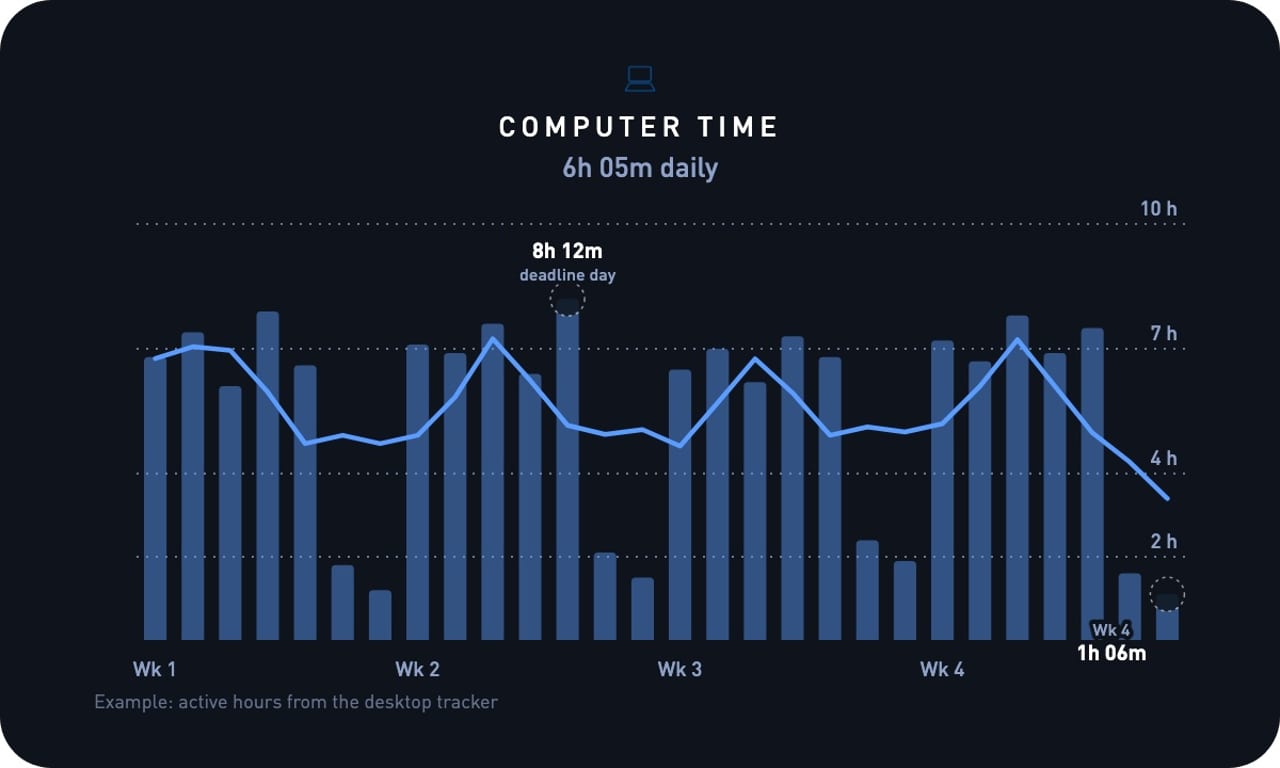
Most people's number is higher than they would guess. A typical month is six to eight hours a day on weekdays, one or two on weekends, and the occasional eight-hour deadline day. For a lot of us the computer is the single largest thing in the day after sleep.
The target is not zero; screens are how most of us work. What matters is the shape of the hours, especially the last one, because a bright screen at 11pm pushes back the time you actually fall asleep and the next morning pays for it.
What it is
Computer time is hours of active use on your computer each day, with the app breakdown underneath: which app was in front and for how long. It is imported from a tracker on the machine, so there is nothing to log.
The chart above is a typical month: six to eight hours on weekdays, one or two on weekends, and one 8-hour deadline day. The weekday total is mostly fixed by the job. The part you control is when it starts and, more importantly, when it stops.
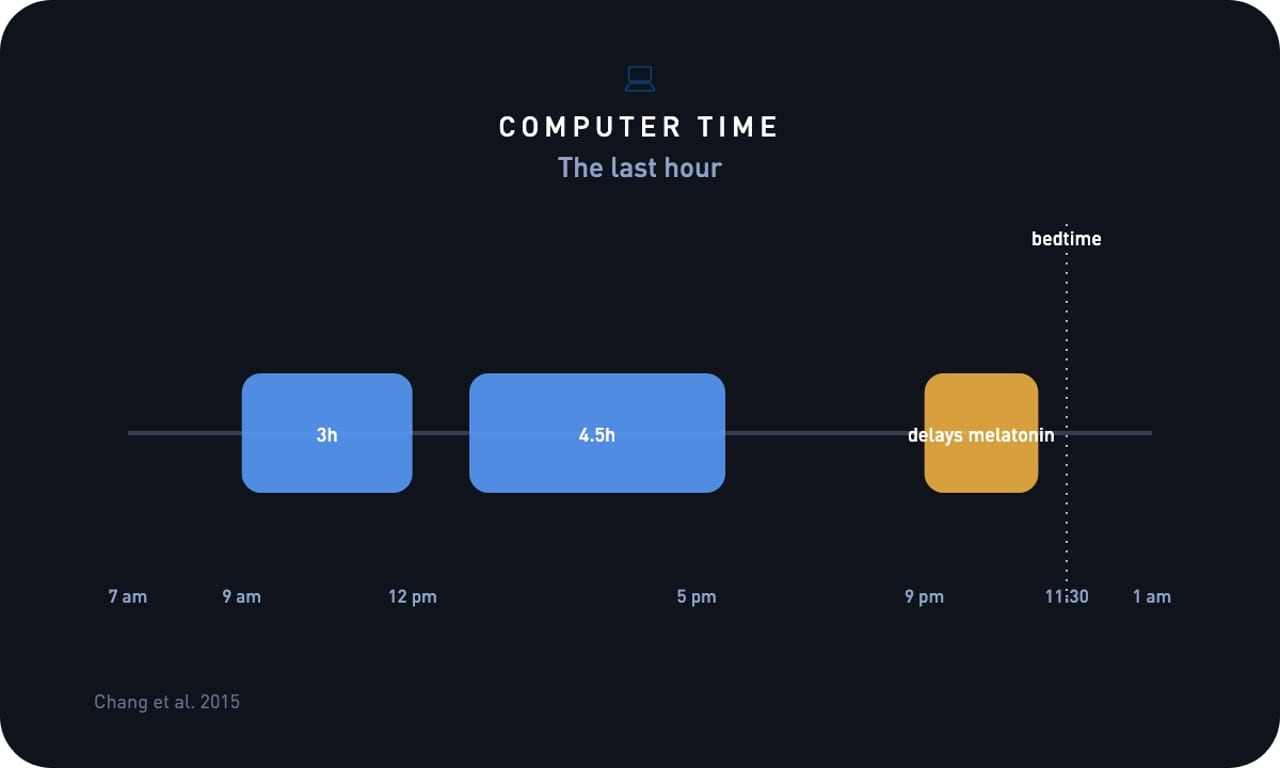
The last hour is the one that costs. A screen at 11pm delays melatonin and pushes back the time you fall asleep, and the next morning's reaction time and mood charts show the bill.
Why it matters for your goals
If you want more energy and focus
Computer time is the denominator for everything else in the day. Seeing that a workday was nine hours at the screen with no break explains the flat afternoon, and seeing the breaks that did happen shows which days felt better and why. The hours are mostly fixed by the job; the edges and the breaks are yours.
If you want to lose weight
Long screen days are long sitting days. The steps chart next to computer time shows whether the sitting blocks are being broken up or not, and a day with nine hours of screen and two thousand steps is a day the energy balance chart will also remember.
If you want to sleep better
The last hour at the screen is the lever. In a controlled study, reading from a screen before bed delayed sleep, cut REM, and left people sleepier the next morning than the same people reading on paper. Closing the laptop an hour earlier moves bedtime, and the sleep timing chart shows by how much.
Where people land
| Typical weekday | 6 to 8 hours |
|---|---|
| Typical weekend day | 1 to 2 hours |
| A deadline day | 8 hours or more |
| The hour before bed | The one that delays sleep |
The total depends on your job more than on you, so it is a poor thing to compare with anyone else. The edges are what to read: the time the first window opens and the time the last one closes, against your own bedtime.
What the research found
The cost of screen hours has been measured in two places: the lab, for what a screen before bed does to the night, and the office, for what interruptions do to the day.
In a 2015 controlled study, evening sessions with a light-emitting ebook device delayed sleep onset, reduced melatonin and next-morning alertness, and reduced REM sleep compared with sessions using printed books. (Chang et al., PNAS, 2015). The hours are mostly fixed by the job; the last one before bed is the one to move.
After an interruption, it took people about 23 minutes to get back to the original task. (Mark, Gudith and Klocke, CHI, 2008). Nine hours at the screen with constant switching is not nine hours of work. The app breakdown shows how much of the day was switching.
A 2022 pooled analysis of 15 studies and 47,471 adults found that mortality risk fell with more daily steps and then leveled off: around 6,000 to 8,000 steps a day for people 60 and older, and around 8,000 to 10,000 for younger adults. (Paluch et al., The Lancet Public Health, 2022). A long screen day is survivable if the sitting is broken up. Read computer time next to steps and aim for the walk, not the shorter day.
What moves it
Toward a better shape, over weeks. A fixed stop time in the evening. A walk that splits the afternoon block. Batching messages instead of keeping them open all day. A screen-free last hour before bed. Keeping weekends light, which is where most people already do well.
Toward a worse shape, within a day. A deadline. A late start that pushes the whole day back. Working from the sofa after dinner. A second monitor of chat open all day, which shows up as app switching rather than hours.
This week. Close the laptop an hour before bed for one week and watch the sleep timing chart. If bedtime moves earlier by even 20 minutes, that is the lever. Break up long sitting blocks with a walk; the steps chart will show whether it is happening.
Everything known to move it
The total is set mostly by the job, so the levers here move the shape of the day: when it starts, when it ends, and how much of it is switching. Raises means later or longer; lowers means the day ends earlier.
Training
| Morning session before the first window | steadies | It fixes the start edge, and a day that starts on time is the one that ends on time. |
|---|---|---|
| A walk that splits the afternoon | steadies | A long screen day is survivable if the sitting is broken up; the steps chart shows whether it happened. Paluch et al., The Lancet Public Health, 2022 |
Sleep
| Screen in the last hour before bed | raises | A lit screen before bed delays sleep, cuts REM, and leaves you sleepier the next morning. Chang et al., PNAS, 2015 |
|---|---|---|
| Short night | raises | A late start pushes the whole day back, and the last window closes later to make up for it. |
| Fixed stop time | lowers | The single most effective lever: the last window closes at the same time whether the work is done or not. |
Nutrition
| Caffeine in the late afternoon | raises | It keeps the evening session going and costs the night; a coffee should be finished roughly nine hours before bed. Gardiner et al., Sleep Medicine Reviews, 2023 |
|---|---|---|
| Eating at the desk | raises | Lunch without closing the laptop turns a break into another hour of screen. |
Lifestyle and environment
| Deadlines | raises | The obvious one, and the reason the total needs the weekly average, not a single day. |
|---|---|---|
| Chat open all day | raises | It shows up as app switching rather than hours, and every interruption costs about 23 minutes to recover from. Mark, Gudith and Klocke, CHI, 2008 |
| Batching messages | lowers | Two or three message windows a day give the rest of it back as uninterrupted blocks. Mark, Gudith and Klocke, CHI, 2008 |
| Phone in another room for the work block | lowers | Fewer switches and a shorter day for the same output. Ward et al., Journal of the Association for Consumer Research, 2017 |
| Working from the sofa after dinner | raises | The evening block is the one that pushes bedtime, and it rarely moves the work forward much. |
| Weekends | lowers | Most people already keep them light; a weekend that looks like a weekday is the thing to notice. |
Gyroscope runs these correlations on your own data: open the trend, tap a long day, and the coach reads it next to your bedtime and steps.
Targets to aim for
| Good | The last window closed an hour before bed most nights |
|---|---|
| Great | A consistent stop time, weekends under two hours, and a walk in every long day |
| Watch | Screen time past 11pm most nights, or ten-hour days with under 3,000 steps |
| See a doctor | Eye strain, headaches, or wrist pain that the day's hours keep bringing back |
Practical ways to improve it
- Pick a stop time and hold it for a week. The time the last window closes is the number that moves your sleep.
- Keep the last hour before bed off the screen. That is the hour the research says costs the most.
- Split the afternoon block with a walk. Ten minutes outside changes the shape of a nine-hour day.
- Batch chat and email into two or three windows instead of leaving them open all day. Fewer switches, same hours.
- Keep weekends light. Most people already do; the chart is there to notice when that stops.
How to track it
Computer time needs a tracker running on the computer itself; no wearable or phone can see it. On a Mac, the Gyroscope desktop app records which app is in front and for how long, and sends the day to your account. It does not record screen contents, keystrokes, or window text, and you can pause it from the menu bar.
The desktop app is rolling out to Gyroscope Max members first, and the trend opens up more widely once it has run on enough machines. If you already track with RescueTime, that history still imports through the integration in Settings. Without any tracker, the honest fallback is to note the time the first window opened and the last one closed, which captures the edges that matter most.
| Gyroscope desktop app | Mac with Apple silicon, macOS 14 or newer; tracking is built in |
|---|---|
| No tracker | Log start and stop times by hand |
How Gyroscope tracks it
Install the desktop app on your Mac and the hours import on their own. Gyroscope charts the daily total against your own baseline with the app breakdown underneath, so a long day always shows what it was spent on.
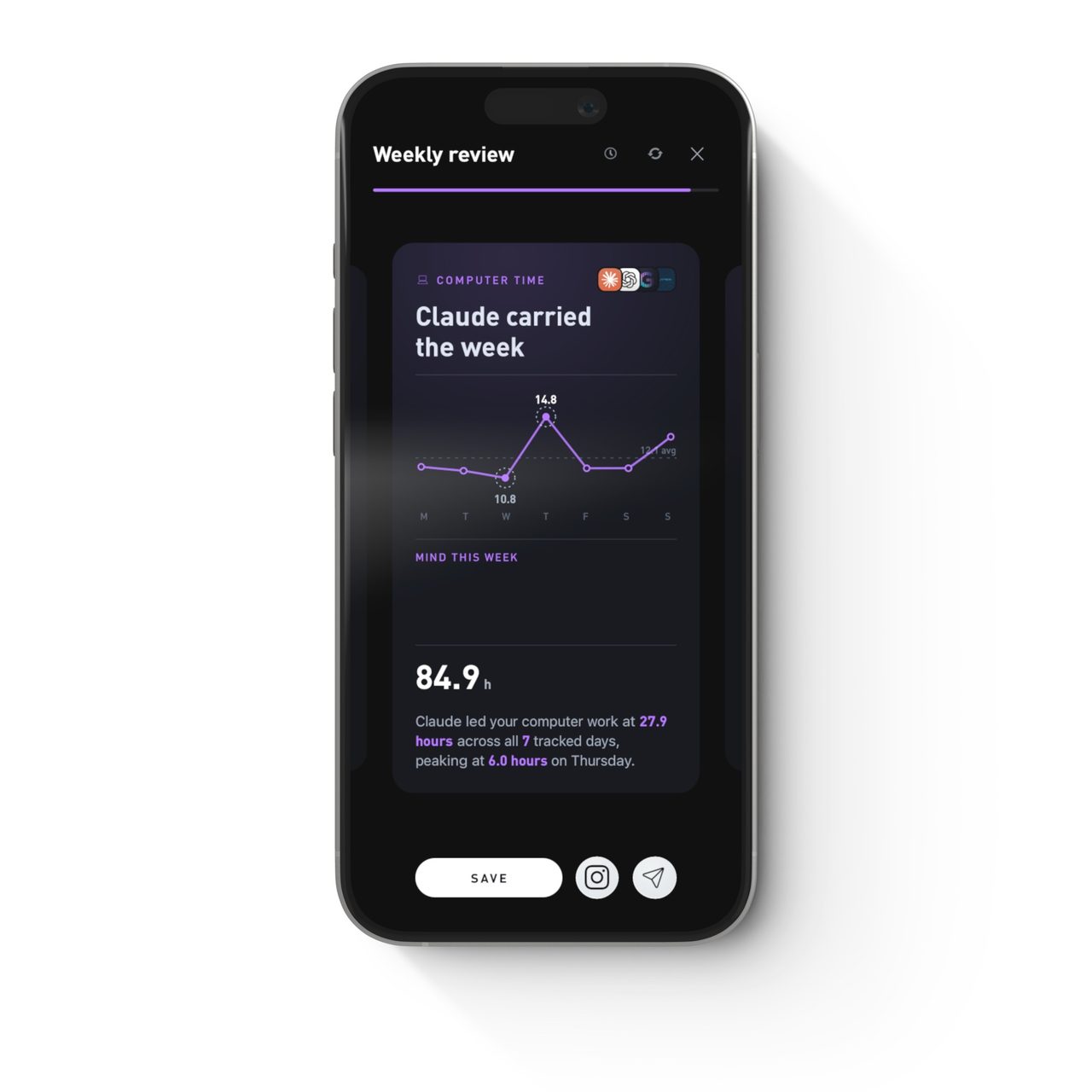
Computer time sits on the Trends tab next to sleep timing, steps, and phone time. The Weekly Review folds computer and phone time together so your whole digital day reads as one picture and names the app that carried the week. Ask the coach about a bad night and it reads the last screen hour alongside it.
It needs about two weeks of tracked days before the weekday and weekend shape is readable.
Works with Mac desktop app.
Questions people ask
- Does it record what I am doing on screen?
- No. The tracker records which app is in front and for how long. It does not capture screen contents, keystrokes, or window text, and it can be paused from the menu bar.
- What about Windows?
- The Gyroscope desktop app is Mac only for now. Windows is planned.
- I already use RescueTime. Does that still work?
- Yes. Connect it in Settings and your RescueTime hours import into the same trend, so nothing is lost if you switch to the desktop app later.
- Is eight hours a day bad?
- Not by itself; for most jobs that is the job. The shape matters more than the total: when the day stops, and whether the sitting is broken up.
- How do I know if the last hour matters for me?
- Close the laptop an hour earlier for a week and watch bedtime on the sleep timing chart. If it moves, you have your answer.
Track your Computer time
Computer Time is tracked by the Gyroscope desktop app, currently part of Gyroscope Max. It opens up more widely later this year.
See Gyroscope Max