
Phone Time
The biggest number you are not tracking, and the one most people guess at half its real size.
Most people wear a watch that counts every step and every heartbeat, and have no idea how many hours went to their phone yesterday. Ask them and the guess comes in low, often by half. The average adult is on the phone close to five hours a day, which makes it the third largest thing in the day after work and sleep.
Three hours a day is about 45 full days a year. It arrives in fragments, a notification here and a quick check there, and each one feels like nothing. That is why it has to be measured rather than felt.
What it is
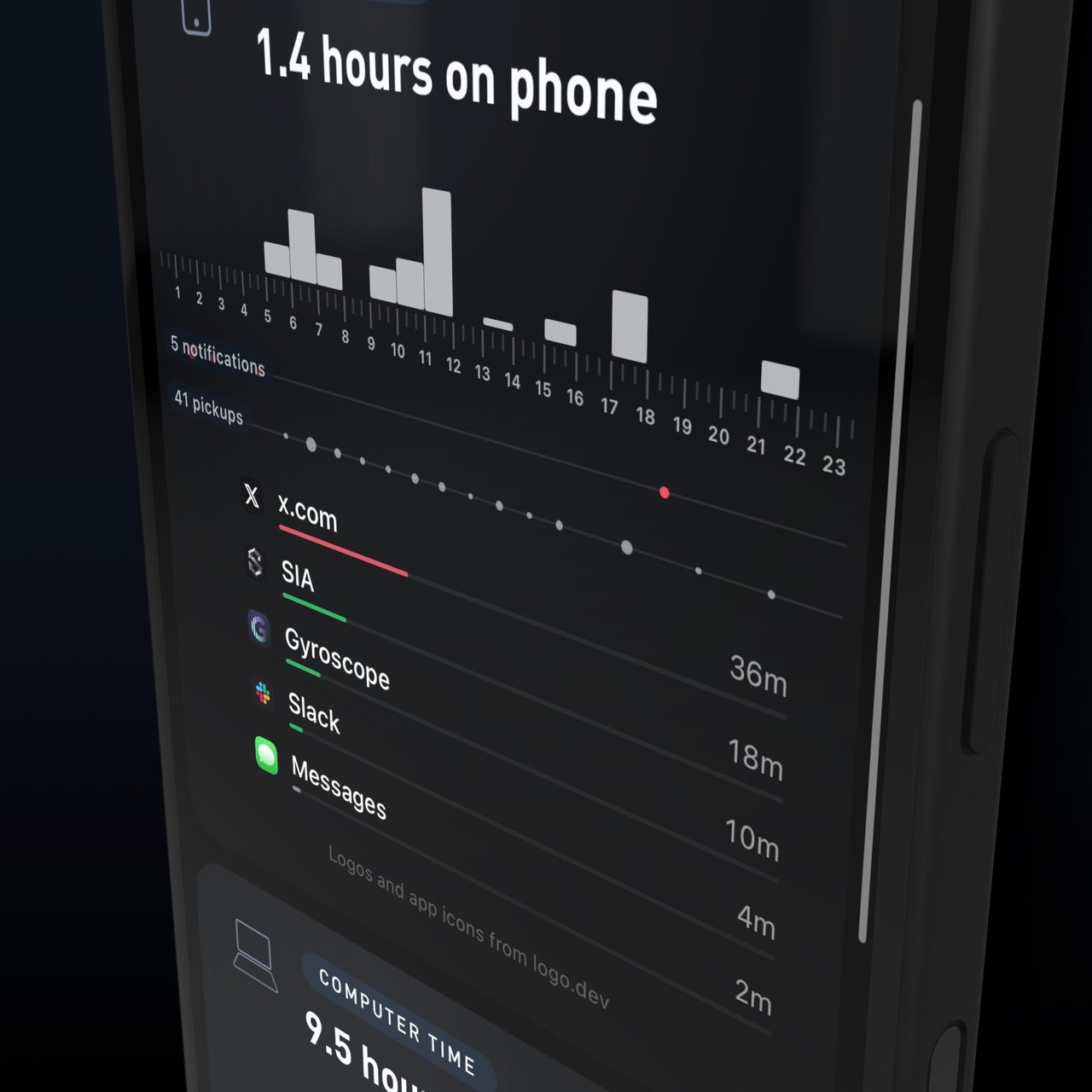
Phone time is yesterday's hours on the phone, shown hour by hour, with pickups, notifications, and minutes per app underneath. It shows when you used the phone, not just how long.
Five minutes of maps, a long call with family, and an hour in a social feed are not the same thing, so the per-app breakdown sits right next to the total, with the hourly chart above it so you can see exactly which part of the day it came from.
Plenty of screen time is work, maps, and talking to people you love. The point is to know which hours were yours and which ones the feed took, and then to run one small experiment rather than a broad digital detox.
Why it matters for your goals
If you want more energy and focus
The cost is not only the hours. Each pickup breaks whatever you were doing before it, and after an interruption it takes about 23 minutes to get back to the task. Forty pickups in a work day is not forty small breaks; it is a day with no uninterrupted hour in it. Pickups and notifications are on the card for that reason.
If you want to sleep better
The hour before bed is usually where the phone wins, and the bill arrives the next morning. Phone use after lights-out goes with later bedtimes, shorter sleep, and more daytime fatigue. The hourly chart makes it obvious whether your phone day ends at 10pm or at 1am, and the Sleep Score next to it shows what that cost.
If you want a better mood
Limiting social media to 30 minutes a day for three weeks measurably reduced loneliness and depression in a controlled study. The per-app breakdown is how you find out which app would be the one to limit, and the mood line shows whether the limit did anything.
Where people land
| Average adult | Close to 5 hours a day |
|---|---|
| What people guess | About half that |
| Three hours a day | About 45 full days a year |
The total is the least useful number on the card. Which apps, which hours, and how many pickups are what change behavior, and the comparison that matters is this week against last week.
What the research found
The cost of the phone has been measured in the lab, in the office, and in a controlled trial of limiting it.
A phone sitting on the desk, face down and silent, measurably reduced working memory and attention compared with leaving it in another room. (Ward et al., Journal of the Association for Consumer Research, 2017). The cost of the phone is not only the hours on it, which is why pickups and notifications are on the card too.
After an interruption, it took people about 23 minutes to get back to the original task. (Mark, Gudith and Klocke, CHI, 2008). Forty pickups in a work day is not forty small breaks, it is a day with no uninterrupted hour in it.
Phone use after lights-out was linked to later bedtimes, shorter sleep, worse sleep quality and more daytime fatigue. (Exelmans and Van den Bulck, Social Science and Medicine, 2016). The hourly chart makes it obvious whether your phone day ends at 10pm or at 1am.
Limiting social media to 30 minutes a day for three weeks significantly reduced loneliness and depression. (Hunt et al., Journal of Social and Clinical Psychology, 2018). One app and one limit, measured for a week, is an experiment you can actually read.
What moves it
Down, over weeks. Charging the phone outside the bedroom. Notifications off for everything but people. A limit on the one app at the top of the list. Leaving the phone in another room for the important work block. Replacing the evening scroll with a walk, training, or cooking.
Up, within a day. Travel days and waiting rooms. A news cycle. A new app or a new group chat. A bad night, which makes the next day's scrolling longer. Being bored and tired at the same time, usually after 10pm.
This week. Pick one change and run it for seven days, then compare the week with the one before it. Charge the phone outside the bedroom and watch your bedtime and Sleep Score. Or put a limit on whichever app tops your list and give that block to something else.
Everything known to move it
Phone hours move more with where the phone is than with willpower. These are the levers with the best evidence, grouped by where they live in your day. Lowers is the goal for most people; raises is what a tired evening looks like.
Training
| Evening training or a walk | lowers | The evening scroll is the largest block for most people, and anything that takes that hour takes it off the card. |
|---|
Sleep
| Charging the phone outside the bedroom | lowers | Removes the after-lights-out block, which is linked to later bedtimes, shorter sleep, and more daytime fatigue. Exelmans and Van den Bulck, Social Science and Medicine, 2016 |
|---|---|---|
| Phone in bed | raises | The hour that shows up after 11pm on the hourly chart, and the one that costs the most sleep. Exelmans and Van den Bulck, Social Science and Medicine, 2016 |
| Short night | raises | A bad night makes the next day's scrolling longer, especially after 10pm when tired and bored arrive together. |
Nutrition
| Caffeine late in the day | raises | A late coffee keeps you awake about an hour longer than you notice, and the phone fills that hour. Drake et al., Journal of Clinical Sleep Medicine, 2013 |
|---|---|---|
| Alcohol in the evening | raises | Drinks and the phone keep each other company late; the evening block runs longer and the night reads worse. |
Lifestyle and environment
| Notifications off for everything but people | lowers | Fewer pickups, and each one that does not happen saves the recovery time after it. Mark, Gudith and Klocke, CHI, 2008 |
|---|---|---|
| A limit on the top app | lowers | Limiting social media to 30 minutes a day for three weeks reduced loneliness and depression in a controlled trial. Hunt et al., Journal of Social and Clinical Psychology, 2018 |
| Phone in another room during work | lowers | Even face down and silent on the desk it reduced working memory and attention. Ward et al., Journal of the Association for Consumer Research, 2017 |
| Travel days and waiting rooms | raises | Expected, and not worth fixing; read the weekly average rather than the day. |
| A news cycle | raises | Pickups climb before hours do; the pickups count is the early warning. |
| A new app or group chat | raises | New arrivals at the top of the app list are the usual cause of a week that jumped. |
| Replacing the evening scroll | lowers | Cooking, reading, or a walk in the 9pm to 11pm slot is where most of the saved hours come from. |
Gyroscope runs these correlations on your own data: open the trend, tap a heavy day, and the coach reads it next to your bedtime and Sleep Score.
Targets to aim for
| Good | Phone day ending before bed, with the late-night bars gone |
|---|---|
| Great | The top app under its limit most days, and pickups falling week over week |
| Watch | Use past midnight most nights, or pickups climbing through the work day |
| See a doctor | Phone use that is crowding out sleep for weeks and you cannot change it on your own |
Practical ways to improve it
- Charge the phone outside the bedroom. It removes the after-lights-out hour without any willpower.
- Turn off notifications for everything that is not a person. Fewer pickups, same phone.
- Limit one app, the one at the top of your list, for one week. Then read the week against the one before.
- Leave the phone in another room for your most important work block and watch pickups for those hours.
- Give the evening scroll a replacement: a walk, a workout, cooking. The hour has to go somewhere.
How to track it
Phone time comes from your iPhone's Screen Time, and Apple requires your permission before it can be read, so nothing is imported silently. Each morning, from the briefing or yesterday's Mind tab, you tap Import your phone time and see a private preview first: the total, the timeline, every app. Save it to your account, or close it without keeping anything.
There is no wearable involved and nothing to install. The one habit is the morning tap; a day you skip is a gap in the chart, not a guess.
| iPhone | Tap Import your phone time in the morning briefing; approve the Screen Time permission once |
|---|---|
| Per-app trends | Any app in the breakdown can become its own trend in the app and on the web |
| No import | Read yesterday's total in Screen Time and log it by hand |
How Gyroscope tracks it
Tap Import your phone time in the morning briefing. Gyroscope reads yesterday from Screen Time, shows you the private preview, and once saved charts the hours, pickups, notifications, and per-app minutes next to your sleep, steps, and mood.
Any app can become its own Trend. The Weekly Review folds phone and computer time together so your whole digital day reads as one picture, the monthly report sets the longer baseline, and your coach reads the same numbers alongside your sleep, mood, movement, and food, and can tell you which apps are upstream of your bad nights.
After a week, open Mind to see the average, the apps behind it, and what your experiment changed. It is included in every membership as of V10.11.
Works with iPhone.
Questions people ask
- Does Gyroscope read my phone in the background?
- No. Apple requires your permission before Screen Time can be read, and each day is imported only when you tap, after a private preview you can close without saving.
- Is it on Android?
- No. Gyroscope is an iPhone app, and the import reads Apple's Screen Time.
- Is the goal zero?
- No. Maps, calls, and messages with people you love are phone time too. The goal is knowing which hours were yours and which the feed took, and changing one thing at a time.
- Why do pickups matter if the hours are low?
- Because each pickup breaks the thing you were doing, and getting back takes about 23 minutes. A two-hour day with sixty pickups has no uninterrupted hour in it.
Track your Phone time
Included in the free app. Download Gyroscope, connect your device, and the trend builds itself.
Get Gyroscope